I’m normally a neat-freak, but not this time, well not since I discovered Clutter (which is for the Mac OS X I hasten to add, you Windoze people just have to dream of getting such a slick app/utility for free for your OS! ;)) I forgotten where I stumbled on it, and I must have downloaded it a while ago as it was just sitting in the downloads folder waiting to be taken care of… well, as today is a holiday in Bahrain and didn’t have much to do, I unarchived it and started playing… this is the result:
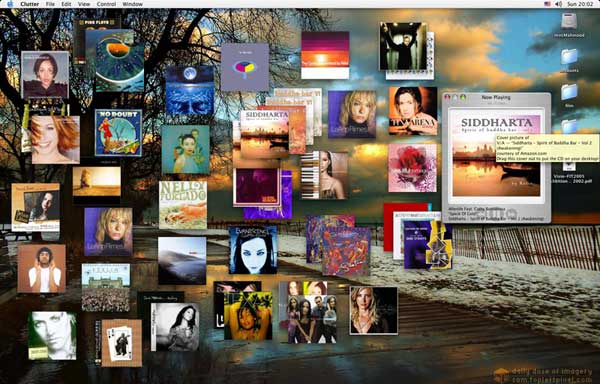
Well what the hell is it then? It’s quite simply giving you back your music collection that you have spent countless hours digitising – only to ultimately lose because the collection now is just a list. Clutter allows you to download the album cover graphic from Amazon or Google for it, once it is downloaded you can copy the graphic to your iTunes and more importantly, you can just drag the album cover on your desktop where it becomes just a floating window really, that you can stack and/or organise the way you want to.
This visual representation of the music collection actually already allowed me to rediscover some of the music I’ve not listened to for a while! I’ve digitised more than 12GB (over 3122 tracks, 296 albums and 621 artists) which can take quite a while to listen to (actually iTunes tells me 9.3 days!), so I just stick to playlists I create every few MONTHS (yeah, I know.. I don’t give a damn).
Having a bunch of album art on the desktop and the ability to just double click on any album and it plays through iTunes is great!
The downside of course is that you’ve got to spend quite some time QAing and assigning album art to your albums… I know that there is a utility somewhere that would scan your collection and download all album art at once, but I forgot where I saw that… it would be nice if someone combines both of these utils, or add this scanning feature into Clutter as well.
What I beautiful wasted day!


Comments
Clutter your desktop!
“You Windoze people just have to dream of getting such a slick app/utility for free for your OS!”
False. I can easily program this for myself, distribute it for everyone on my site (for free), and have it open source for those mod enthusiasts… I can see myself coding this in C#.
But just out of curiosity, what’s your current screen resolution!? Mine is 1600×1200.
Tim.
http://naaman.net/
Re: Clutter your desktop!
C’mon then! get on with it and do something.. I still am a windoze user as well as mac, in fact I spend more time on windoze unfortunately at the office, at home, it’s my mini-mac connected to my SGI FP1600SW through its multilink adapter and I wouldn’t give this one up for the world! It’s the best screen I’ve ever used. period!
Here’s an old fuzzy picture of the 1600SW, at that time running Fedora at home.
Clutter your desktop!
This sounds cool!
I don’t think a day is ever wasted.
Re: Clutter your desktop!
oh sorry Tim, the resolution on this baby is 1600 x 1024 (16:10 aspect ratio, which is weird but wonderful!)
Clutter your desktop!
Tim Your image resizer sounds like a good tool to have. Got a question for you. Does your Photoshop Image Resizer plugin work with paint shop pro 8 or 9. I know many of the photoshop plug ins do.
billT
Clutter your desktop!
billT, It won’t work because Corel doesn’t share the same scripting controls that Adobe provides for developers… But I’ll look into it, and see if Corel provides any of its own scripting controls.
Tim.
Clutter your desktop!
Thanks, got it set up on photoshop 7.0 nice and easy to use.
billT